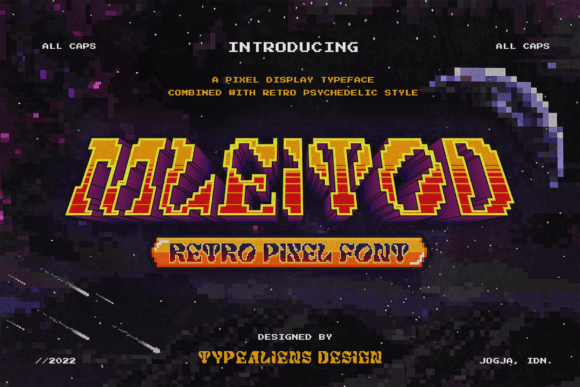
Mleitod: A Retro-Pixel Font with Funky Flair
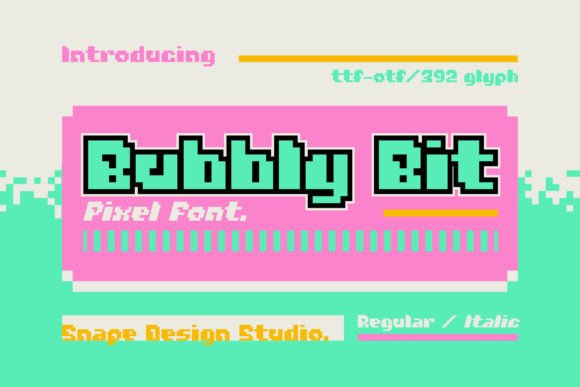
If you're looking for a font that brings a sense of nostalgia and energy to your designs, Mleitod is a standout choice. This retro-pixel display font captures the essence of classic video games and 80s aesthetics, making it ideal for anyone who wants to add a playful or eye-catching touch to their work.
Unlike traditional fonts that often feel modern or minimalist, Mleitod embraces a bold, pixelated style that feels both familiar and fresh. Its characters are designed with blocky, angular edges that mimic the look of old-school digital displays. This gives it a distinct visual identity that can make your projects stand out in a crowded digital space.
What Makes Mleitod Unique?
Mleitod’s charm lies in its simplicity and personality. Each letter is crafted with attention to detail, ensuring clarity while maintaining a fun, retro vibe. The font works well in both large and small sizes, making it versatile for different design needs. Whether you're creating a game title, a poster, or a website header, Mleitod adds a unique flair that other fonts might not offer.
One of the key features of Mleitod is its ability to evoke emotion. The pixelated style can instantly transport viewers back to the days of arcade games and early computer graphics. This makes it a great tool for creators who want to tap into that nostalgic feeling or add a whimsical tone to their work.
Why Use Mleitod?
There are several reasons why someone might choose Mleitod over other fonts. For starters, it's perfect for projects that require a bold, recognizable style. Game developers, for example, often use retro fonts to give their titles a vintage feel that resonates with players. Mleitod fits right in with that aesthetic.
Designers and marketers also find value in Mleitod when they want to create something that stands out. In a world where most fonts are clean and straightforward, Mleitod offers a refreshing alternative. It can be used to highlight important text, create eye-catching headlines, or even add a quirky element to a brand's visual identity.
For educators and hobbyists, Mleitod can be a fun way to engage students or bring creativity to personal projects. It’s especially useful in presentations, infographics, or classroom materials that benefit from a more dynamic and expressive look.
Where Can You Use Mleitod?
The versatility of Mleitod means it can be applied in a wide range of contexts. Here are some practical examples:
- Game Titles: Mleitod is ideal for indie game developers or retro-themed games that want to maintain a classic look.
- Posters and Banners: Use it to create eye-catching posters for events, music festivals, or art exhibitions.
- Website Headers: Add a fun, retro twist to your site’s navigation or section titles.
- Branding Materials: Incorporate Mleitod into logos, business cards, or promotional materials for a unique, memorable look.
- Mobile Apps: Design app icons or UI elements that reflect a playful, nostalgic theme.
Its pixelated style also works well in digital art, animations, and social media content. Whether you're designing a YouTube thumbnail or a Twitter banner, Mleitod can help you create a cohesive and engaging visual experience.
Considerations Before Using Mleitod
While Mleitod is a powerful tool, there are a few things to keep in mind before incorporating it into your projects. First, consider the context. Since it has a strong visual identity, it may not be suitable for all types of content. For example, formal documents or professional reports might not benefit from its playful style.
Also, ensure that the font is legible in the size and format you plan to use it. While Mleitod is clear at larger sizes, it may become less readable when used in small text. Always test it in different scenarios to see how it performs.
Finally, check the licensing terms if you're using Mleitod for commercial purposes. Some fonts have restrictions on usage, so it's important to verify that you’re compliant with any applicable rules.
Getting Started with Mleitod
If you're new to using custom fonts, getting started with Mleitod is straightforward. Most design software, such as Adobe Photoshop, Illustrator, or Figma, allows you to install and use custom fonts. Once installed, you can apply Mleitod to your text layers, adjust the size and spacing, and experiment with different color combinations to achieve the desired effect.
For those working on websites, you can embed Mleitod using web font services like Google Fonts or by uploading the font file directly to your site. Make sure to optimize the font for fast loading times to maintain a smooth user experience.
Whether you're a designer, developer, educator, or hobbyist, Mleitod offers a creative way to express yourself and enhance your work. Its retro-pixel style brings a sense of fun and nostalgia that can elevate any project with a unique, funky touch.